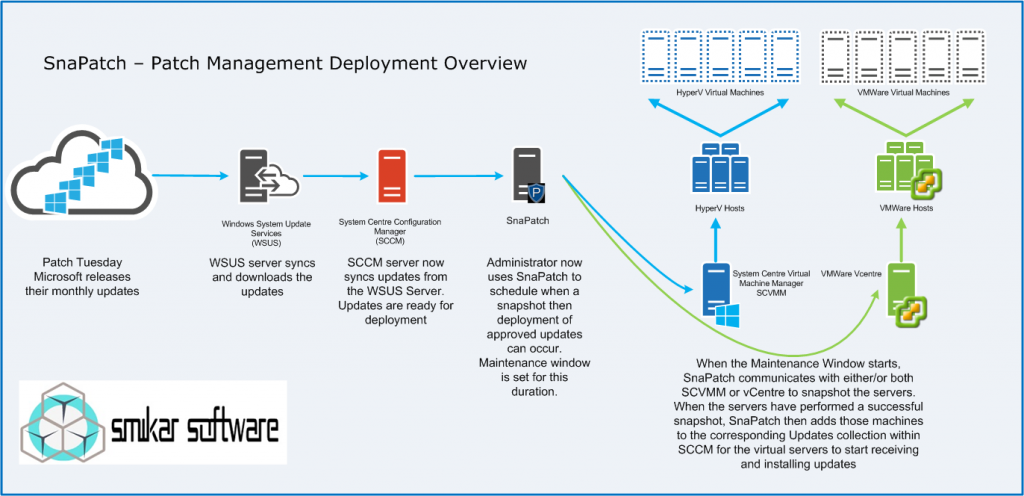
Schedule Windows Update Deployments
SnaPatch FAQ
Q – What are the requirements for SnaPatch?
SnaPatch requires that you have SCCM 2012 R2, at least one vCenter running 5.0 (or above) or SCVMM and a SQL server containing the SCCM database. The SQL instance may reside on the same server as the SCCM server or on a remote SQL server. As for hardware and OS, SnaPatch needs very little, 2 vCPU, 4GB RAM and 10GB free space. It will run on Server 2008R2 SP1 (SP1 is a requirement for 2008R2), Server 2012 or Server 2012R2, 2016.
Q – What permissions are required for SnaPatch to function?
You must have local administrator access on the server to run SnaPatch. It also requires that the powershell execution policies for both x64 and x86 are set to “remotesigned”. As SnaPatch communicates and interacts with SCCM, VMware, SQL, HyperV and remote computers, you must provide accounts that have the relevant level of permissions to perform certain functions. Details around these requirements can be found under the support pages.
Q – Some of my servers don’t show an image or the image isn’t correct
We have tried to provide an image for as many servers and computers as we could, however it’s impossible to cover them all. If you have a machine that is not showing an image or the image is incorrect, please let us know the make and model and we will gladly add it to the image database as part of the next release.
Q – Does SnaPatch require an agent to be deployed?
No, SnaPatch does not use any agents. It communicates using the .NET framework, custom PowerShell code, WMI and SQL queries.
Q – Can SnaPatch deploy patches to physical servers?
Absolutely! You may deploy patches to physical servers just same as virtual servers, of course however, snapshots will not be taken.
Q – How does licensing work?
SnaPatch is licensed based on the number of servers within your SCCM database. For example, if you purchase a 250 server license but have more than 250 servers in your environment, SnaPatch will only display the first 250.
Q – Can I upgrade my license to cover more servers?
Certainly, just send us an email with your current details and what license level you would like to upgrade to and we will help you out.
Download a trial of Snapatch today
To trial SnaPatch, fill in the form below to get access to download the trial software.
.
Snapshotting your servers prior to Deploying Updates doesnt have to be hard.
With SnaPatch, you can automate the entire process, ensuring a reliable recovery point and a smooth patching experience.