Fake Lastpass emails pose as password vault backup alerts
- January 21, 2026
- 11:58 AM
- 0
LastPass is warning of a new phishing campaign disguised as a maintenance notification from the service, asking users to back up their vaults in the next 24 hours.
The malicious emails include a link that allegedly takes users to a site where they can create an encrypted backup, where the attacker likely tries to hijack accounts or steal vault master passwords.
“Please be advised that LastPass is NOT asking customers to back up their vaults in the next 24 hours; rather, this is an attempt on the part of a malicious actor to generate urgency in the mind of the recipient, a common tactic for social engineering and phishing emails,” LastPass warns.

The LastPass Threat Intelligence, Mitigation, and Escalation (TIME) team believes that the campaign started on January 19 and observed phishing messages delivered from email addresses of the type ‘support@lastpass[.]server8’ and ‘support@sr22vegas[.]com’ with the following subject lines:
- LastPass Infrastructure Update: Secure Your Vault Now
- Your Data, Your Protection: Create a Backup Before Maintenance
- Don’t Miss Out: Backup Your Vault Before Maintenance
- Important: LastPass Maintenance & Your Vault Security
- Protect Your Passwords: Backup Your Vault (24-Hour Window)
Crafted to appear as genuine LastPass communications, the emails say that users need to back up their vaults locally to secure their data due to an upcoming infrastructure maintenance.
“While your data remains fully protected at all times, creating a local backup ensures you have uninterrupted access to your credentials during the maintenance window,” reads the phishing email.
“In the unlikely event of any unforeseen technical difficulties or data discrepancies, having a recent backup guarantees your information remains secure and recoverable.”
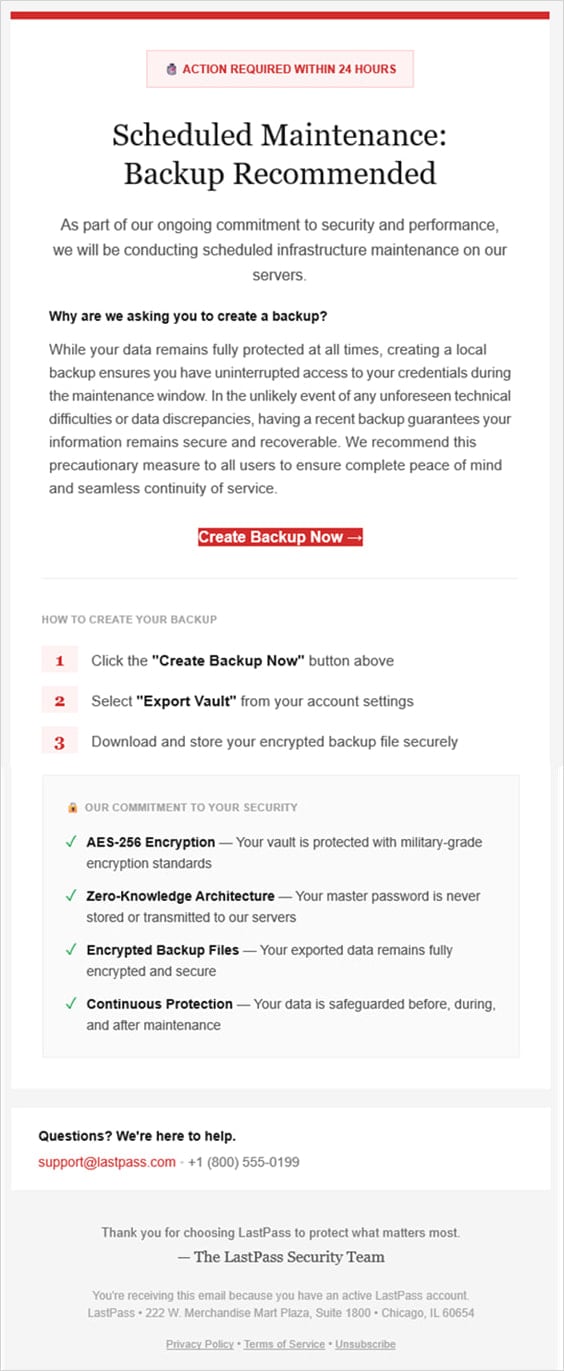
Source: LastPass
Users who click on the ‘Create Backup Now’ button embedded in the email are redirected to a phishing site at ‘mail-lastpass[.]com,’ which appears to be offline at the time of writing.
LastPass comments that the attackers chose to launch this campaign during a holiday weekend in the United States, to catch them understaffed and less prepared for a prompt response.
The password management company reminds users that it will never ask users for their master passwords, urging them to report such incidents to ‘abuse@lastpass.com.’
LastPass users are frequently targeted by phishing campaigns that use various themes and lures to trick them into revealing their passwords.
In October 2025, a phishing campaign used fake death claims to trigger a legacy inheritance process.
A week before, another campaign used fake breach alerts to urge users to download a more secure desktop version of the client app.

Secrets Security Cheat Sheet: From Sprawl to Control
Whether you’re cleaning up old keys or setting guardrails for AI-generated code, this guide helps your team build securely from the start.
Get the cheat sheet and take the guesswork out of secrets management.
Source: www.bleepingcomputer.com