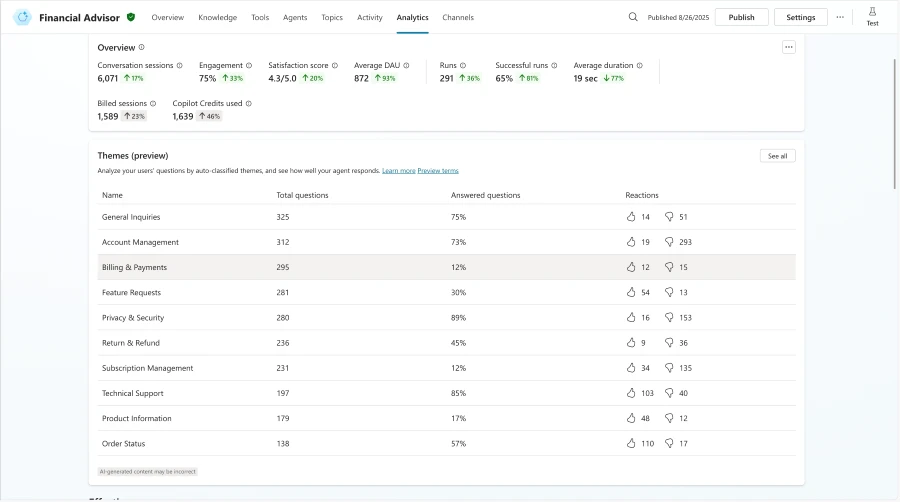
Themes for generative AI questions in public preview
This feature looks at generative AI questions from the previous week and groups them into suggested themes. The themes show what types of questions customers are asking most and provide a detailed analysis of how well the agent responded. This helps makers quickly identify gaps in coverage and focus improvements where they matter most. This feature is in preview for all customers using generative answers for agents meeting the minimum threshold of 50 weekly questions.
Insights for unanswered generative AI questions in public preview
Copilot Studio now surfaces themes for unanswered generative AI questions directly in the Analytics dashboard. Makers can quickly spot patterns in what users are asking but not getting answers for, helping them prioritize knowledge updates and reduce coverage gaps with less manual review.
Agent monthly consumption limits (general availability)
Analytics now display each agent’s monthly Copilot credits limit (as set in the Power Platform admin center) alongside month-to-date usage. Makers no longer need to switch tools to monitor consumption and can act earlier if an agent is trending toward its limit.
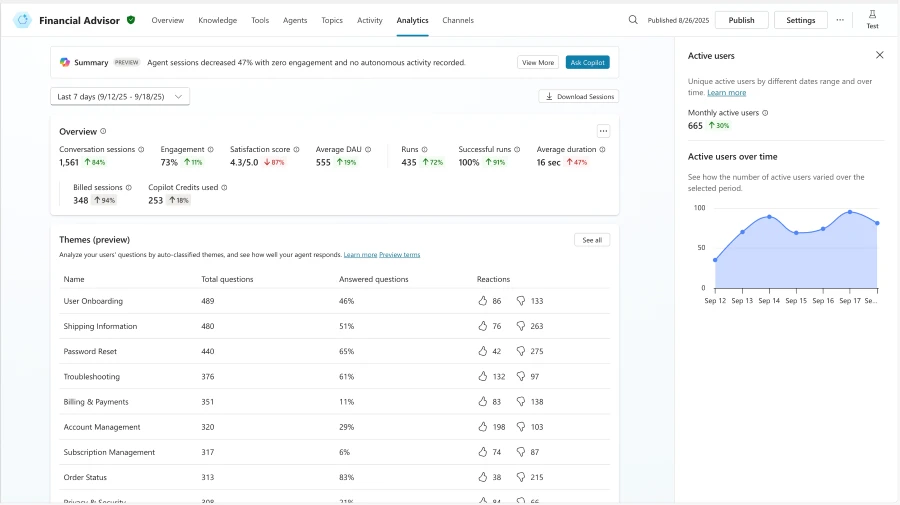
Active users metric (general availability)
A new view provides visibility into the unique users interacting with an agent. Custom reports include data on daily active users, trend lines over time, and monthly active users. This metric helps teams understand engagement patterns beyond session counts. This data is generally available for agents that are configured for authenticated users.
ROI analysis for agent runs (general availability)
Makers can now define and track savings for autonomous agent runs segmented by time, money, or both. These can be tracked at either the run or tool level. Results are calculated automatically for the selected analytics period, with settings applied retroactively to past runs. This makes it simple to measure ROI in real time and guide investment decisions with data.
These various enhancements expand the analytics toolkit, helping teams measure adoption, spot performance issues, and quantify the business value of their Copilot Studio agents. Learn more about analyzing conversational agent effectiveness.
Upskill with agents
Build your skills with Copilot Studio Agent Academy
We’re excited to introduce Copilot Studio Agent Academy: a free, self-paced curriculum designed to help makers and developers build real, useful agents with Microsoft Copilot Studio.
The curriculum is structured into three progressive levels: Recruit (available now), Operative (coming soon), and Commander (coming early next year). Each level builds on the last, guiding learners from foundational concepts to advanced enterprise deployment. The Recruit module covers how to set up your environment, create your first agent, add topics and generative answers, and publish it to Microsoft Teams. Every module includes guided labs created by the Microsoft Power Platform Advocacy team.
For experienced makers, Agent Academy is a chance to pick up new tips and tricks, strengthen your best practices, and point your colleagues to an approachable way to get started. With a low barrier to entry and room to grow, the curriculum provides a clear path from first steps to organizational scale. As an added bonus, the first 100 learners to complete Recruit will receive a Credly badge for their agents.
Your learning journey starts today. Explore Agent Academy and help bring more makers into the Copilot Studio community.
Check out all the updates live as we ship them, as well as new features releasing in the next few months here: What’s new in Microsoft Copilot Studio.
To learn more about Microsoft Copilot Studio and how it can transform your organization’s productivity, visit the Copilot Studio website or sign up for our free trial today.
Source: www.microsoft.com